

The Org Chart Model: 5-Layer Architecture
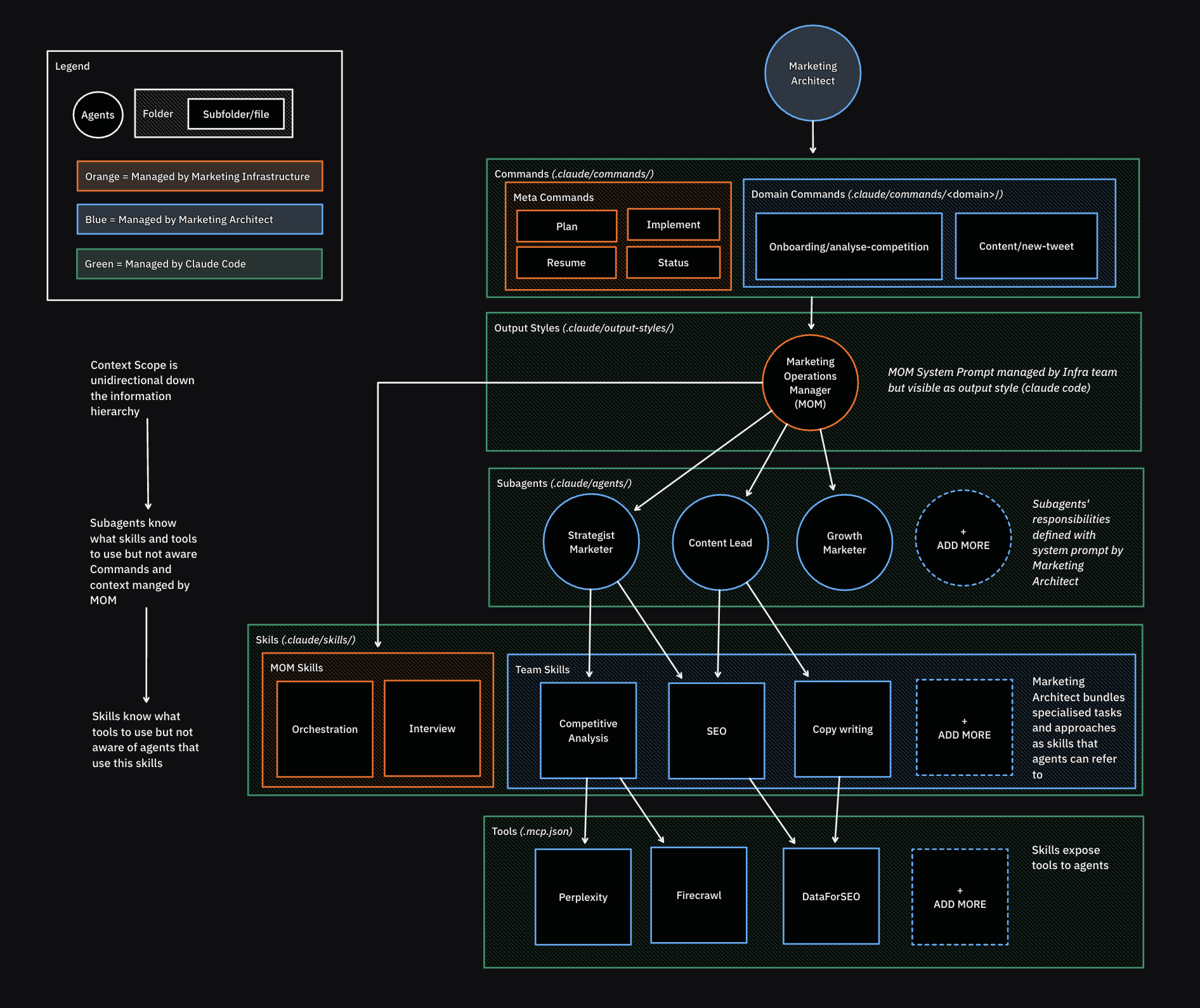
The Marketing Architect's Org Chart
Why an “Org Chart”?
Marketing professionals understand org charts. They’ve worked in them, reported through them, designed them. An org chart is a mental model for:- Layers of responsibility
- Delegation and reporting
- Specialized roles
- Clear boundaries
The 5 Layers
Layer 1: Marketing Architect (You)
What This Layer Is
The human designer and operator of the entire system. This is you.Responsibilities
- Define the vision and strategy for your marketing operations
- Design the org chart (which sub-agents exist, which skills are needed)
- Collaborate with the Operations Manager on work
- Create domain-specific workflows (domain commands)
- Select which tools to integrate
- Approve plans before execution
What You Own
- Brand strategy (
/strategy/directory) - Research domains (
/research/directory) - Sub-agent definitions (
.claude/agents/) - Domain skills (
.claude/skills/{domain}/) - Domain commands (
.claude/commands/{domain}/) - Tool selections (MCP configuration)
What You Don’t Control
- Core architecture (owned by infrastructure team)
- Output style of Operations Manager (ensures compliance)
- Meta commands (architectural patterns)
- Core skills (orchestration, project management)
Key Insight
You’re not a “user” of a tool. You’re an architect designing a marketing operation. The system doesn’t do marketing “for you”—it’s infrastructure that makes you more capable. Learn more: Marketing Architect LayerLayer 2: Operations Manager (Primary AI Agent)
What This Layer Is
The primary AI agent you communicate with directly. It orchestrates all work, routes tasks, and ensures outputs comply with the architectural rules.Responsibilities
- Receive requests from Marketing Architect
- Decide: Execute directly or delegate to sub-agents?
- Orchestrate multi-step workflows
- Ensure brand consistency and architectural compliance
- Use skills for orchestration-level work
- Make work visible (PLAN.md, TODO.md)
What Defines This Layer
Output Styles (.claude/output-styles/) define the Operations Manager’s:
- Behavior and working style
- How it communicates
- How it ensures architectural compliance
- When to delegate vs execute
Controlled By
Infrastructure team — Output styles ensure the primary agent works consistently within the architecture, regardless of which marketing architect is using it.Key Insight
This isn’t a chatbot you prompt. It’s your marketing operations manager who knows your brand, your team structure, your workflows, and ensures everything stays on-brand and systematic. Learn more: Operations Manager LayerLayer 3: Team Layer (Sub-agents)
What This Layer Is
Specialized AI agents that handle specific types of work. Like employees on your team with defined roles.Responsibilities
- Receive tasks from Operations Manager
- Execute specialized work in isolated context
- Use skills relevant to their role
- Return results to Operations Manager
Example Roles
- Brand Analyst - Market research, competitive analysis
- Content Writer - Blog posts, social media, emails
- Campaign Strategist - Multi-channel campaign planning
- Data Analyst - Customer insights, performance analysis
What Defines This Layer
Agent definitions (.claude/agents/{role}.md) define:
- Role description and responsibilities
- Communication style and tone
- Which skills they have access to
- How they approach their work
Controlled By
Marketing Architect — You define which roles exist, how they behave, and what they’re responsible for.Key Insight
Sub-agents work in isolated contexts. They don’t know about each other or the full system—they just know their job. This prevents context overflow and ensures focused, specialized work. Learn more: Team LayerLayer 4: Skill Layer (Capabilities)
What This Layer Is
Reusable workflows and capabilities that agents (both Operations Manager and sub-agents) can invoke to get work done.Responsibilities
- Provide specialized methodologies
- Use progressive disclosure (load details only when needed)
- Map to specific roles or be available system-wide
- Evolve and improve over time
Example Skills
- Conducting Market Research - Research methodologies, data analysis
- Writing Brand-Consistent Content - Content frameworks, voice guidelines
- Managing Projects - Orchestration, tracking, reporting
- Analyzing Qualitative Data - Coding, themes, insights extraction
What Defines This Layer
Skill files (.claude/skills/{skill-name}/SKILL.md) use:
- Progressive disclosure - SKILL.md is < 500 lines, points to detailed files
- Gerund naming - “Conducting Research”, “Writing Content”
- Modular structure - Supporting files for different aspects
Controlled By
Shared ownership:- Infrastructure team: Core skills (orchestration, project management)
- Marketing architects: Domain-specific skills
Key Insight
Skills make your system smarter over time. You’re not re-explaining how to do research every time—you build a “Conducting Market Research” skill that codifies your methodology and improves with refinement. Learn more: Skill LayerLayer 5: Integration Layer (Tools)
What This Layer Is
External services, APIs, and tools that enable the system to interact with the outside world.Responsibilities
- Provide data (Perplexity for research, Firecrawl for web scraping)
- Enable actions (Slack for notifications, Figma for design)
- Connect to external systems (CRM, analytics, etc.)
Example Tools
- Perplexity - Web research, fact-checking
- Firecrawl - Web scraping, content extraction
- Replicate - Image generation, AI models
- Figma - Design asset creation
- Slack - Team notifications
What Defines This Layer
MCP (Model Context Protocol) configuration defines which tools are available and how they’re accessed.Controlled By
Marketing Architect — You choose which tools to integrate based on your needs.Key Insight
Tools are mapped to skills. A skill like “Conducting Market Research” might leverage Perplexity and Firecrawl. This creates a clean separation: skills define how work gets done, tools provide the external capabilities needed. Learn more: Integration LayerThe Critical Principle: One-Way Dependencies
Context Flows Downward Only
What This Means
✅ Allowed:- Operations Manager can reference which sub-agents exist
- Sub-agents can reference which skills they can use
- Skills can reference which tools they leverage
- Skills cannot reference which agents use them
- Sub-agents cannot reference the Operations Manager
- Tools cannot reference anything in the system
Why This Matters
1. Prevents Circular Dependencies If Layer 4 could reference Layer 3, and Layer 3 references Layer 4, you create circular loops that cause chaos. 2. Enables Independent Evolution You can change a tool (Layer 5) without affecting skills (Layer 4) above it, as long as the tool’s interface stays the same. 3. Manages Context Size Each layer only needs to know about the layers below it, preventing context overflow. 4. Makes System Navigable You always know where to look: “If I need to change how research is done, I edit the skill. If I need to change who does research, I edit the agent definition.”Comparison to Traditional Org Charts
| Traditional Org Chart | Agentic Marketing Architecture |
|---|---|
| CEO designs strategy | Marketing Architect designs system |
| VPs manage departments | Operations Manager orchestrates |
| Employees do work | Sub-agents execute tasks |
| Skillsets (hiring requirement) | Skills (reusable capabilities) |
| Tools/software | Integration Layer (MCP tools) |
| Management reports up | Context flows down only |
| Org evolves with hiring | System evolves by adding agents/skills |
How the Layers Work Together: Example
Scenario: Marketing Architect wants to analyze a competitor’s positioning.Step-by-Step Flow
Key Observations
- Each layer has a clear job
- Context flows downward (Operations Manager tells Brand Analyst what to do)
- Results flow upward (tools → skill → agent → Operations Manager → human)
- No layer bypasses others (Marketing Architect doesn’t talk directly to tools)
Benefits of This Model
1. Intuitive for Marketers
You already understand org charts. This maps directly to concepts you know.2. Clear Ownership
Each layer has defined responsibilities. No ambiguity about who owns what.3. Scalable
Need more capabilities? Add skills. Need new roles? Define sub-agents. It grows organically.4. Maintainable
One-way dependencies mean changes are predictable and contained.5. Prevents Chaos
Unlike prompt-based workflows (which become spaghetti), this creates structure that prevents entropy.Common Questions
Q: Can sub-agents talk to each other?
No. Sub-agents work in isolated contexts. Only the Operations Manager orchestrates cross-functional work. Why? Prevents context overflow and maintains clear delegation chains.Q: Can I bypass the Operations Manager and talk to sub-agents directly?
Not recommended. The Operations Manager ensures architectural compliance. Bypassing it risks inconsistent outputs.Q: How many sub-agents should I have?
Start small. 3-5 specialized roles cover most needs. Add more only when clear specialization is needed.Q: Do I need to define all 5 layers to start?
No. You can start with just Layer 2 (Operations Manager) and add layers as needed. The architecture supports growth.Q: What if a skill needs a tool that doesn’t exist yet?
You add it. Marketing Architects control which tools are integrated (Layer 5).What’s Next
Now that you understand the conceptual model, dive into each layer:- Marketing Architect Layer - Your role as system designer
- Operations Manager Layer - Primary agent orchestration
- Team Layer - Sub-agent definitions and roles
- Skill Layer - Building reusable capabilities
- Integration Layer - Connecting external tools
“The org chart isn’t just a metaphor—it’s how your system actually works.”