

Plan/Implement Pattern
What This Is
The Plan/Implement Pattern is a systematic workflow for complex work that separates thinking from doing. Inspired by The Phoenix Project’s principles of work visibility and WIP management, this pattern ensures that:- Work is planned before execution begins
- Plans are reviewed by Marketing Architects before implementation
- Progress is visible throughout execution
- Work in progress (WIP) is managed systematically
The Core Pattern
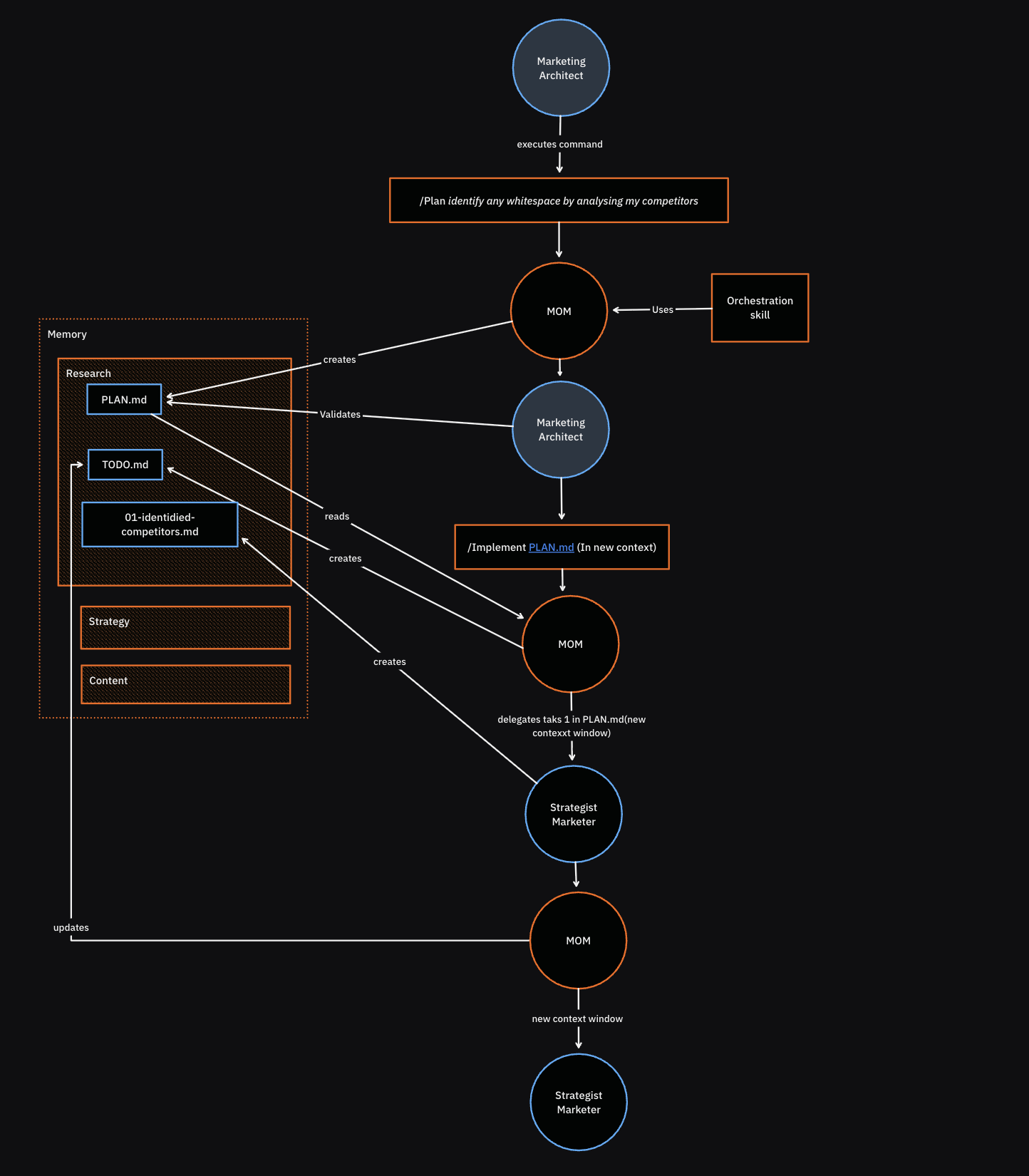
plan and implement keeps the human in control while leveraging AI execution capabilities.
PLAN.md Structure
Location: Created in the relevant execution directory (e.g.,/research/{domain}/execution/2025-10-21/PLAN.md)
Created by: Operations Manager (during plan meta command)
Purpose: Map out the approach BEFORE execution begins
Standard PLAN.md Template
What Makes a Good Plan
A good PLAN.md:- ✅ Shows clear reasoning for the approach
- ✅ Identifies specific resources needed (not generic)
- ✅ Acknowledges risks and how to mitigate them
- ✅ Provides realistic estimates (not overly optimistic)
- ✅ References specific files that will be used
- ✅ Maps which agents will do which work
- ❌ Vague approach (“do research”)
- ❌ Generic resources (“use research skills”)
- ❌ No risk assessment
- ❌ Unrealistic timeline
- ❌ Doesn’t specify which files/agents/tools
TODO.md Structure
Location: Same directory as PLAN.md (e.g.,/research/{domain}/execution/2025-10-21/TODO.md)
Created by: Operations Manager (during implement meta command)
Purpose: Track work in progress, make status visible
Standard TODO.md Template
TODO.md Best Practices
Update frequency:- After every major task completion
- When blockers are encountered
- At phase transitions
- Minimum: Every 3-4 completed tasks
- Finish current work before starting new work
- Reduces context switching
- Prevents 20 half-finished projects
- Clear ownership (which agent is doing what)
- Don’t hide problems
- Flag blockers as soon as they’re discovered
- Describe what’s blocking progress
- Propose mitigation or escalate to Marketing Architect
Phoenix Project Connection
Work Visibility
Phoenix Project principle: “You can’t manage what you can’t see.” How this pattern implements it:- PLAN.md shows approach before work starts
- TODO.md shows progress during execution
- Both files are committed to Git (permanent record)
- Marketing Architect can see status at any time
Limiting WIP (Work In Progress)
Phoenix Project principle: “Finish work before starting new work.” How this pattern implements it:- TODO.md shows what’s currently in progress
- Best practice: One task marked “In Progress” at a time
- Complete current step before moving to next
- Prevents context switching chaos
Making Problems Visible Early
Phoenix Project principle: “Problems should be flagged early, not hidden.” How this pattern implements it:- Blockers section in TODO.md
- Notes capture decisions and issues
- Marketing Architect can intervene early
- Prevents late-stage surprises
Approval Gates
Phoenix Project principle: “Constrain WIP at the constraint point.” How this pattern implements it:- Human approval required between
planandimplement - Marketing Architect is the constraint (strategic thinking)
- AI handles execution (high throughput)
- Work doesn’t start until plan is approved
When to Use This Pattern
✅ USE Plan/Implement When:
- Complex multi-step work (research projects, campaign planning)
- High stakes (brand strategy, major launches)
- Unclear requirements (need to map out approach first)
- Multiple agents involved (orchestration complexity)
- Learning mode (want to see how system works)
- Need audit trail (compliance, documentation)
❌ DON’T USE Plan/Implement When:
- Simple one-off tasks (“Create a tweet about X”)
- You trust the system (you know it will do the right thing)
- Speed over visibility (need fast execution)
- Exploratory work (just trying something out)
Alternative: /yolo Mode
What it is: Skip planning, execute directly in one shot. When to use it:- ⚡ Fast execution
- 🎯 Direct results
- 🧹 No overhead
- ❌ No approval gate
- ❌ No progress visibility
- ❌ Can’t intervene mid-execution
- ❌ No audit trail
- You trust the system to do the right thing
- Task is simple and low-risk
- Speed matters more than visibility
- You don’t need documentation
- Complex, multi-step work
- High stakes (strategy, major projects)
- Need to review approach first
- Want audit trail
Real-World Examples
Example 1: Research Project
Example 2: Simple Task (No Plan Needed)
Example 3: /yolo Mode
Meta Command Details
The plan Meta Command
Invocation:
- Operations Manager analyzes the request
- Determines approach (which skills, agents, files, tools)
- Creates PLAN.md with detailed plan
- Waits for Marketing Architect approval
- PLAN.md file in appropriate directory
- Explanation of approach
- Request for approval
The implement Meta Command
Invocation:
- PLAN.md exists and is approved
- Marketing Architect has reviewed approach
- Operations Manager loads approved PLAN.md
- Creates TODO.md for tracking
- Executes plan step-by-step
- Updates TODO.md after major milestones
- Flags blockers if encountered
- Delivers results
- TODO.md (progress tracking)
- Deliverables specified in PLAN.md
- Final summary
File Location Patterns
For Research Projects
For Campaign Projects
For Ad-Hoc Work
Anti-Patterns to Avoid
❌ Creating Plans That Are Too Vague
Bad:❌ Not Updating TODO.md
Bad:❌ Using Plan/Implement for Simple Tasks
Bad:❌ Implementing Without Approval
Bad:Integration with Other Workflows
Works With: Research Workflow
The Plan/Implement pattern is embedded in the research workflow:Works With: Content Generation
For complex content projects:Works With: Campaign Planning
Success Criteria
You’re using this pattern correctly when: ✅ Complex work has a PLAN.md before execution starts ✅ Marketing Architect reviews plans before implementation ✅ TODO.md shows clear status at any point in time ✅ Blockers are flagged immediately (not hidden) ✅ Simple tasks skip planning (no unnecessary overhead) ✅ /yolo is used appropriately (for trusted, simple work) ✅ Work is visible throughout (Phoenix Project principle) ✅ WIP is limited (one task in progress at a time) You’re doing it wrong when: ❌ Implementing without approval ❌ Plans are vague or generic ❌ TODO.md is never updated ❌ Using plan/implement for one-line tasks ❌ Using /yolo for complex, high-stakes work ❌ Multiple tasks “in progress” simultaneously ❌ Blockers hidden until endSummary
The Plan/Implement Pattern is systematic execution inspired by The Phoenix Project. It:- Separates thinking from doing (plan first, execute second)
- Keeps humans in control (approval gate)
- Makes work visible (PLAN.md and TODO.md)
- Manages WIP (one task in progress at a time)
- Flags problems early (blockers section)